

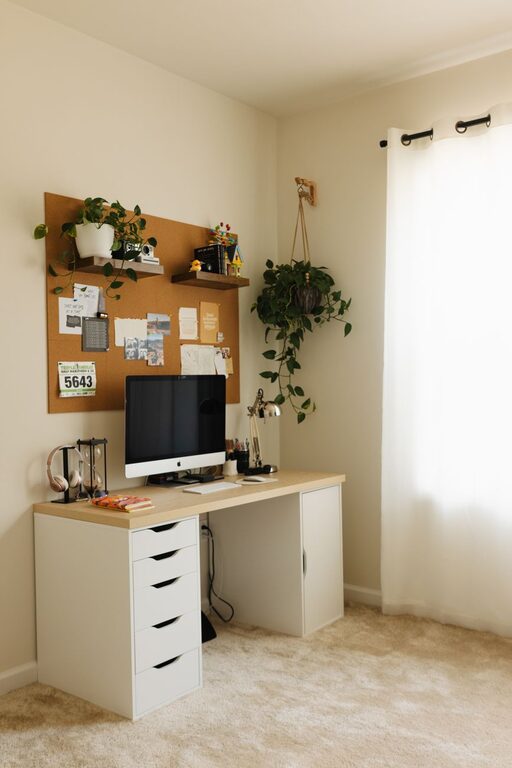
Creating a home workspace that balances comfort and functionality is essential for staying focused and motivated while working from home. Whether you have a dedicated room or a small corner in your living area, a thoughtfully designed workspace can significantly improve your work experience.
In this post, we’ll explore practical tips to help you design a cozy and functional home office that suits your needs.
Choose the Right Location
The first step in setting up your workspace is selecting an appropriate spot. Ideally, this area should:
– Have good natural light to reduce eye strain and boost mood.
– Be quiet and away from high-traffic zones to minimize distractions.
– Offer enough space for your work essentials without feeling cramped.
If a separate room isn’t an option, consider using room dividers or screens to create a defined work area.
Invest in Comfortable and Ergonomic Furniture
Comfort is key to maintaining productivity throughout the day. Here’s what to keep in mind:
– Ergonomic Chair: Choose a chair that supports your lower back and encourages good posture.
– Adjustable Desk: A desk with adjustable height options lets you alternate between sitting and standing.
– Desk Size: Ensure your desk has enough surface area for your computer, documents, and other supplies.
Proper furniture reduces the risk of aches and strains, helping you work longer and more comfortably.
Optimize Lighting
Lighting plays a crucial role in your workspace comfort:
– Maximize Natural Light: Position your desk near a window when possible.
– Supplement with Task Lighting: Use adjustable desk lamps to focus light where it’s needed.
– Avoid Glare: Position screens and light sources to prevent glare on monitors.
Well-balanced lighting keeps your eyes comfortable and improves concentration.
Organize Your Space Efficiently
Clutter can hinder productivity. To keep your workspace organized:
– Use drawer organizers and trays to separate supplies.
– Install shelves or pegboards to store books and tools vertically.
– Keep frequently used items within arm’s reach.
– Regularly clear your desk to maintain a tidy environment.
An organized workspace helps you find what you need quickly and minimizes distractions.
Personalize Your Workspace
Adding personal touches makes your workspace inviting:
– Decorate with plants to bring a touch of nature indoors, which can reduce stress.
– Use artwork or photos that inspire you.
– Choose colors and decor that make you feel calm and focused.
Personalization adds warmth to your workspace, making it a place you enjoy spending time.
Manage Cables and Technology
A tangled mess of cables can be frustrating and unsafe. To keep your technology setup neat:
– Use cable organizers or clips to bundle cords.
– Invest in a charging station to manage multiple devices.
– Keep your desktop digital files and email inbox organized for efficiency.
A tidy tech setup contributes to a clutter-free and productive environment.
Set Boundaries and Establish Routine
A cozy and functional workspace is more than furniture and decor; it’s also about mindset:
– Define your work hours to separate professional and personal life.
– Use a door or a sign to signal your availability to family members.
– Take regular breaks to stretch and refresh.
Setting boundaries helps maintain work-life balance and keeps your workspace effective.
Keep Comfort Supplies Handy
Small comforts can make a big difference:
– Have a water bottle nearby to stay hydrated.
– Use a cozy blanket or cushion for added comfort.
– Keep snacks within reach for energy boosts.
These little touches help you stay comfortable and focused during long work sessions.
—
Creating a cozy and functional home workspace is about combining comfort, organization, and personal style. By following these tips, you can build an environment that supports your productivity while making your work-from-home days more enjoyable. Remember, your workspace should adapt to your needs, so don’t hesitate to adjust it as you learn what works best for you.